How Atlassian improved Jira and Confluence performance on Arm Neoverse-based AWS Graviton

This blog is co-authored by Bhumik Patel, Director, Server Ecosystem Development, Cloud BU, Arm, Paulo Almeida, Principal Site Reliability Engineer, Atlassian, and Nitin Kumar, Senior Partner Solution Architect, AWS
For engineering teams, migrating workloads to Arm-based cloud infrastructure is an important milestone, but it is only the first step. Atlassian’s migration journey began with moving more than 3,000 EC2 instances for Jira and Confluence to Arm Neoverse-based AWS Graviton processors, while managing risk across production environments. The next stage is evaluating the performance of these workloads on Arm-based cloud infrastructure under real-world operating conditions.
For developers and platform teams, that means understanding how applications behave in production-like conditions, identifying workload-specific bottlenecks, and tuning systems to improve latency, throughput, and cost efficiency. These improvements depend on visibility, measurement, and targeted optimization.
AWS Graviton migration phases: compatibility, performance optimization, and scale
The first phase answers a compatibility question: does the workload run correctly on Arm? The second phase answers a performance question: what does the workload need from the architecture, runtime, and platform to perform better at scale?
A successful migration proves that an application can run on a new architecture. But it does not automatically prove that the application is running as efficiently as possible.
For large Java applications such as Jira and Confluence, performance depends on more than instance selection. CPU utilization, memory access patterns, cache behavior, Java Virtual Machine (JVM) configuration, scaling policies, and traffic shape all affect how the workload performs.
Architecture signals guide optimization
Arm-based cloud infrastructure gives developers access to efficient compute, but optimization depends on how effectively teams collect, interpret and act on performance signals. Atlassian’s investigation highlights the value of connecting system-level metrics with lower-level CPU signals, including cache misses, branch mispredictions, instructions retired, stalled cycles, memory behavior and CPU optimization. AWS-native tooling can add another layer of guidance by helping teams connect those performance signals to infrastructure decisions, including monitoring, right-sizing, and instance recommendations.
For teams looking to apply a similar diagnostic approach, an Arm Performix workflow could make this process more concrete for Java workloads running on AWS Graviton. This is a recommended approach for similar optimization efforts, separate from Atlassian’s specific migration and tuning work. Teams can also use AWS-native tools such as Amazon CloudWatch, AWS Compute Optimizer for right-sizing and instance recommendations, and the AWS Graviton Technical Guide alongside architecture-specific profiling tools. Developers can profile a running workload, then use tools like Performix to collect system-level, application-level, and hardware counter data across CPU utilization, memory bandwidth, latency and cache behavior. From there, guided analysis can help identify whether performance is limited by compute, memory, cache efficiency, or core utilization, giving teams a clearer path from observed latency or throughput behavior to targeted changes such as JVM code cache sizing, tiered compilation, memory tuning, or scaling policy adjustments.
Per Atlassian’s engineering blog, these signals helped move the investigation from general assumptions to specific, reproducible findings. For example, the team observed 25 percent higher L3 cache misses per thousand instructions on AWS Graviton3 compared with its Intel counterpart, which suggested possible CPU cache thrashing. The team evaluated JVM-level changes, including JVM code cache sizing and tiered compilation, to make better use of Graviton’s L3 cache. Atlassian also investigated TLB tablewalk behavior across AWS Graviton generations and enabled Transparent Huge Pages to help reduce Translation Lookaside Buffer (TLB) pressure in relevant cases. Because Transparent Huge Pages can introduce latency spikes in some Java scenarios, developers should validate this setting against their own workload behavior before applying it broadly.
The broader pattern is clear. Developers should start with system-level behavior, then use hardware and runtime metrics to narrow the search. Tools like Performix can help make that process more repeatable by connecting observed application behavior with the underlying performance signals that shape it. Micro-benchmarks can help, but only after the team understands which part of the system is limiting real application performance.
JVM tuning strategies for Java workloads on Arm-based AWS Graviton
For Java workloads, runtime configuration can have a major impact on how efficiently the application uses underlying compute resources. Atlassian’s investigation pointed to several areas where JVM tuning helped align the workload with the platform.
One example was JVM code cache sizing. Giving the just-in-time compiler more room is not always better. In some workloads, a more constrained code cache can make compilation behavior more selective and improve how frequently used code fits into cache. Another example was tiered compilation, which balances fast compilation and deeper optimization based on how code is executed.
These are not universal fixes. They are examples of a more durable practice: tuning the runtime based on observed workload behavior. The right answer depends on whether the workload is latency-sensitive, throughput-oriented, memory-bound, or another constraint.
How workload placement affects performance at scale
Optimization does not end at the application process. At cloud scale, instance availability, fallback behavior, and traffic placement can affect both reliability and cost.
Atlassian’s migration plan separated latency-sensitive workloads from throughput-oriented workloads. User-facing traffic required the latest generation of Graviton instances, while some non-user-facing workloads could run on older generations without affecting the customer experience. This distinction helped reduce pressure on the most constrained capacity pools while preserving performance where it mattered most.
The team also used fallback strategies to support resilience when specific instance types were not available. For developers and platform engineers, this is a reminder that performance engineering is also systems engineering. The goal is not only to make one benchmark look better; it is to maintain performance, availability, and cost efficiency as conditions change.
Measured results build confidence
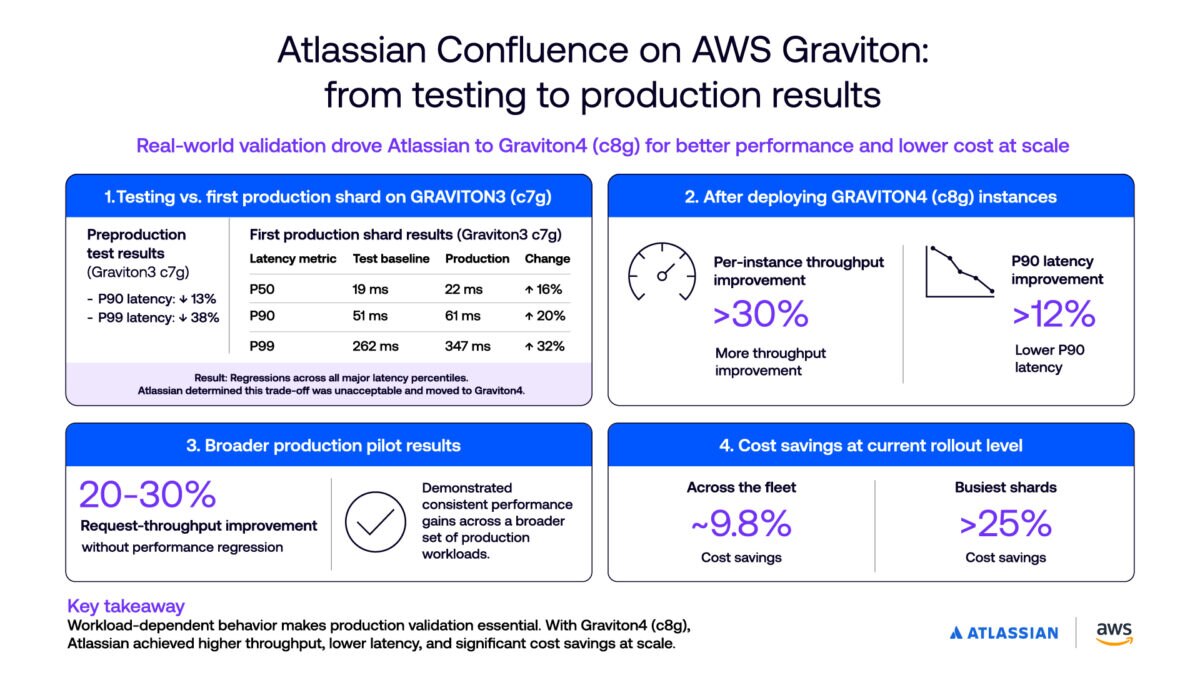
The outcome of this optimization work was measurable. After deploying AWS Graviton4-based c8g instances, Atlassian reported:
- More than 30 percent improvement in per-instance throughput; and
- More than 12 percent lower P90 latency.
A broader production pilot also showed request-throughput improvements of 20 to 30 percent without a performance regression. At the current rollout level, Atlassian reported approximately 9.8 percent cost savings across the fleet, while some of its busiest shards achieved savings above 25 percent.
These results provide concrete evidence that architecture improvements, JVM tuning, workload placement, and production validation can deliver performance and cost gains together.
They were not automatic benefits of migration. Instead, they were achieved through a deliberate process of testing, profiling, tuning, rollout planning, and production validation.
Why workload-specific testing matters for AWS Graviton optimization
Atlassian’s experience shows why production-scale applications need workload-specific analysis. Early AWS Graviton investigations showed improvement opportunities for latency across Jira and Confluence, but broad load-test numbers alone did not explain why performance varied across endpoints or instance generations.
The team shifted from passive benchmarking to a more diagnostic approach. Instead of looking only at aggregate latency, they defined a benchmark method tied to system behavior, including throughput at breaking latency. That helped identify where the system stopped serving more throughput while maintaining acceptable response times. The analysis also revealed performance constraints that were subsequently resolved through a combination of AWS Graviton4 architectural improvements and targeted Java Virtual Machine (JVM) optimization.
Confluence also demonstrated why teams must validate promising test results in production. Initial testing suggested that Confluence could run on Graviton3-based c7g instances but showed regressions across major latency percentiles. Atlassian determined that this trade-off was unacceptable and moved Confluence to Graviton4-based c8g instances. This experience reinforced that workload-dependent behavior can make production validation as important as preproduction testing.
This is important because application performance is rarely limited by one factor. A compute-bound workload may respond well to higher per-core performance. A memory-sensitive workload may require closer attention to cache behavior, translation lookaside buffer pressure, page size, or runtime memory layout. A mixed workload may require a different scaling strategy for user-facing and background tasks.
Best practices for optimizing workloads on AWS Graviton
Teams evaluating Arm-based cloud infrastructure can apply several lessons from this journey. Much of the modern software stack is already optimized for Arm and can deliver strong performance out of the box on AWS Graviton. Atlassian’s case is unusual because of its extreme scale, with more than 3,000 EC2 instances running Jira and Confluence workloads, so most customers will not need the same level of deep, workload-specific tuning to see benefits. However, its experience offers useful guidance for teams that want to move beyond migration and identify additional opportunities to improve performance, efficiency, and cost at scale.
First, define a benchmark that reflects how users experience the system. Aggregate load-test results can hide the endpoint, traffic, or latency behavior that matters most. Measure both steady-state performance and breaking points, such as the point where latency rises faster than throughput.
Second, profile before tuning. Use operating system, runtime, and hardware-level metrics to understand whether the workload is compute-bound, memory-bound, latency-sensitive, or throughput-oriented. This helps teams focus optimization work on the actual constraint rather than applying generic changes that may not improve performance.
Third, tune the runtime for the workload. JVM, memory, and compilation settings can change how efficiently applications use the architecture. For Java applications, review JVM configuration, garbage collection behavior, code cache sizing, tiered compilation, and memory settings against observed production-like behavior.
Fourth, validate in production-like environments. Performance confidence comes from testing against representative traffic, data shape, and scaling conditions. Load tests should reflect real user journeys, endpoint mix, request concurrency, background jobs, and data volumes so teams can see how the application behaves under realistic pressure. When possible, follow preproduction testing with a controlled production rollout, because workload-specific regressions may only appear under real traffic and data conditions.
Fifth, compare results across relevant AWS Graviton generations and instance sizes. Some workloads may benefit most from the latest instances, while others can run efficiently on earlier generations or smaller instance types without affecting the customer experience. Do not assume that one instance generation will produce the same result across different applications, even when early tests appear favorable.
Finally, design for operational flexibility. Mixed instance policies, architecture-aware launch templates, and fallback strategies can help teams balance performance with availability. This flexibility allows teams to preserve service reliability while optimizing for cost, capacity, and performance over time. AWS-native tooling and architecture-specific profiling tools can support this process by helping teams connect workload behavior with monitoring, right-sizing, and instance selection decisions. For teams looking to apply similar practices across other workloads, Arm learning paths provide practical benchmarking and optimization guidance across a wide range of Arm-based use cases.
Arm and AWS Graviton help teams optimize cloud performance at scale
AWS Graviton’s custom implementation of Arm Neoverse cores, combined with the AWS Nitro System, delivers purpose-built performance for cloud workloads. Together with the right measurement and tuning practices, AWS Graviton gives developers a platform for running demanding applications more efficiently at scale.
Migrating to AWS Graviton can unlock strong price-performance benefits for cloud workloads, but further gains come from understanding how applications behave under real operating conditions. By connecting workload behavior with architecture signals, runtime tuning, and operational strategy, teams can unlock additional performance and efficiency at scale.
Additional resources
Any re-use permitted for informational and non-commercial or personal use only.
Editorial Contact
Stay informed with Arm's top stories, insights, and conversations.



Latest on X

Together with @Supermicro, we're advancing high-density, liquid-cooled AI infrastructure powered by Arm AGI CPUs, helping data centers scale compute while addressing the growing demands of agentic AI workloads. 💪

AI's rapid growth is putting the spotlight on data center infrastructure.
At @Theinformation's WTF Summit earlier this week, Arm CMO Ami Badani joined Nscale's Nidhi Chappell and The Information's Phoebe Liu to discuss the state of the AI data center buildout and what's next

A robot must think, react and act simultaneously, with AI models running at different speeds within one system.
The Arm compute platform supports diverse workloads across reasoning, perception and real-time control, helping developers scale physical AI.
At @Robo_Business,

Google's Gemini Robotics ER 2 is advancing how robots reason, plan and adapt.
At Arm, we're exploring these capabilities with @googlecloud to better understand future robotics compute needs, as part of our broader focus on scalable physical AI. https://okt.to/49w0SJ

Ready, player one? Neural Dawn is yours to explore! 📱
Co-developed by Arm and Sumo Digital, Neural Dawn is now available to download, bringing cinematic lighting, ray tracing and neural graphics to mobile gaming.
Powered by Arm Neural Technology and the Arm Mali G2-Ultra NX

2x performance per rack 🚀
That's what independent testing from Signal65 validates - demonstrating the performance of Arm AGI CPU for agentic AI workloads. Arm's Mohamed Awad shares why designing compute from the ground up delivers results.
https://okt.to/46TBdn

Physical AI moves faster when the ecosystem builds together.
Arm Total Design for Physical AI brings silicon, software, safety, security, validation, and more into one collaborative ecosystem to help build, validate, and scale full-stack solutions on Arm.
Hear from Dermot